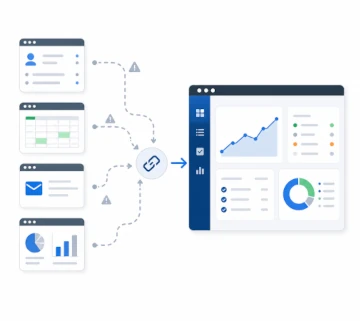
Most businesses should not start with custom software. A standard tool is often the right first choice. It can be faster to launch, easier to test, and less expensive at the beginning. For many common needs, off-the-shelf software is more than enough.
The question is not whether custom systems are better than standard tools. The better question is whether the current way of working still fits the business.
When off-the-shelf software works well
Off-the-shelf software is usually a good fit when the process is common, the team can adapt to the tool, and the tool supports the work without too many manual steps. Examples include basic accounting, simple project management, email marketing, ecommerce platforms, support desks, booking tools, and CRM systems.
Using a proven tool can also reduce risk. The product has existing documentation, a user base, regular updates, and familiar workflows. If the business problem is standard, a standard solution is often the most practical path.
This also applies to websites. A WordPress or WooCommerce website can be a sensible foundation when the goal is to publish content, sell products, manage pages, and keep ownership understandable. In those cases, the right answer may be a better business website, better hosting, or clearer integrations rather than a fully custom platform.
When workarounds become the problem
Problems start when the business spends more time working around the software than using it. Teams may copy data between systems, maintain spreadsheets beside the official tool, repeat the same manual checks, or avoid useful improvements because the current platform does not support the workflow.
These workarounds can look harmless at first. Over time, they become operational cost. They slow down staff, create mistakes, hide important information, and make reporting harder. The business may still be paying for software, but the real system becomes a fragile mix of tools, spreadsheets, emails, and habits.
For example, a team may use one tool for sales enquiries, another for orders, a spreadsheet for internal status, email for approvals, and manual exports for reports. Each tool may be good on its own. The problem is the workflow between them.
Where custom systems can help
A custom system can make sense when the workflow is specific to the business and difficult to support with standard software. That might include a client portal, an internal operations tool, a workflow dashboard, a booking or approval process, integration between existing tools, or automation that reduces repeated manual work.
Custom does not have to mean large. Many useful systems start as a focused first version that solves one clear operational problem. More workflows, reports, integrations, or automation can be added later when the business needs them.
This is why the first version should be practical. The goal is not to rebuild the whole business in software. The goal is to remove a clear bottleneck, improve visibility, or make one important process easier to manage.
How to choose the right direction
The decision should start with the business process, not with the technology. Useful questions include:
- What work is repeated often?
- Where do mistakes or delays usually happen?
- Which information is copied between tools?
- What does the team track in spreadsheets because the main system does not support it?
- Which process would create the most value if it became clearer, faster, or easier to manage?
- Which existing tools are still useful and should remain in place?
If the answers point to a common business need, an existing product may be the right answer. If the answers point to a specific workflow that gives the business its own way of operating, a custom system may be worth exploring.
The middle ground
The best solution is often not a full replacement. A custom system can connect with existing tools, fill the gaps around them, or create a clearer interface for a specific process. This avoids rebuilding everything and keeps useful software in place.
For example, an ecommerce business may keep WooCommerce for products and checkout, use an accounting tool for invoices, and add a small custom dashboard for internal order handling. A service company may keep its CRM but add a portal where customers can upload documents, track requests, or approve steps.
This middle ground is often the most useful path for businesses. It respects what already works, reduces risk, and focuses custom development where it creates real operational value.
Hosting and long-term ownership
Custom systems also need a reliable foundation after launch. A useful system should be maintainable, hosted responsibly, and supported as the business changes. That is why custom software decisions often connect with tailored managed hosting, backups, monitoring, access control, and future improvements.
Long-term ownership matters. If the business depends on a system, it should be clear who maintains it, how updates are handled, where the data lives, and what happens when new workflows are needed.
The practical outcome
For businesses, the practical goal is not to own more software. The goal is to reduce friction, improve visibility, and make important work easier to manage. Sometimes a standard tool does that. Sometimes a custom system does. The right answer is the one that supports the business with the least unnecessary complexity.